

How do you open the console in Rust?
Press F1 – the console opens on top of the game, you type a command in the field at the bottom and confirm it with Enter. Press F1 again to close it.
- Commands are typed without a leading slash:
graphics.fov 90, not/graphics.fov 90. Commands with a slash, such as/home, are chat commands from server plugins and go in the chat, not in the console. - Most settings are variables: typing the name alone (e.g.
graphics.fov) shows the current value, typing the name and a value changes it. find <text>lists commands and variables containing that text, e.g.find fovorfind graphics. It's the quickest way to check whether a command exists in the current version of the game.- Arguments with spaces go in quotes, e.g.
chat.say "hello everyone".
Using the console is not cheating – the commands below are part of the game and work on every server, official ones included. Commands that would give you an advantage (flying, teleporting, spawning items) are blocked unless the server has made you an admin.
The most useful Rust console commands for players
The commands players use most are graphics.fov, perf, fps.limit, kill, combatlog, bind and client.connect. They work without admin rights:
| Command | What it does |
|---|---|
graphics.fov 90 |
Sets the field of view (90 is the maximum) |
perf 1 |
Shows FPS in the corner of the screen (perf 0 hides it) |
fps.limit 144 |
Limits the frame rate |
kill |
Kills your character, e.g. when you're stuck in rocks |
combatlog |
Shows your recent hits: who, with what, from how far, how much damage |
bind <key> <command> |
Binds a command to a key |
unbind <key> |
Removes a key binding |
client.connect <IP:port> |
Connects to a server by its address |
client.disconnect |
Leaves the server |
chat.say "text" |
Sends a chat message from the console |
gc.collect |
Frees unused memory (a short freeze, then often smoother play) |
find <text> |
Searches the list of commands |
quit |
Closes the game |
How do you change FOV in Rust?
Type graphics.fov 90 in the F1 console – 90 is the maximum field of view in Rust. The same setting is the field of view slider in the game options, the console is just faster.
A wider FOV (90) shows more around you, which is why most PvP players use it. A narrower one (e.g. 70–75) makes distant objects look bigger and the edges of the screen less stretched. Typing graphics.fov on its own shows your current value.
Is there a zoom command in Rust?
No – Rust has no zoom command for players. You magnify the view with scopes and sights on weapons, or with binoculars. The closest thing in the console is a lower FOV (e.g. graphics.fov 70), which gives a slightly closer view – it narrows the whole view, it's not a real zoom.
How do you show FPS and improve performance?
perf 1 shows FPS on screen, fps.limit caps the frame rate and gc.collect frees memory when the game starts to stutter.
| Command | What it does |
|---|---|
perf 0 |
Hides the performance overlay |
perf 1 |
FPS |
perf 2 and higher |
FPS plus more statistics – each level adds more (up to perf 6) |
fps.limit 144 |
Caps FPS at 144 – useful to match your monitor and keep the GPU cooler |
gc.collect |
Runs garbage collection right away |
Stutters every few minutes in Rust are often the game cleaning up memory. gc.collect forces that cleanup at a moment you choose, for example when you're safe in your base. Bigger performance gains come from the graphics settings in the menu (shadows, draw distance, grass) and from enough RAM in your PC.
Combatlog and kill: who shot me?
combatlog lists your recent hits – the attacker, the weapon, the distance, the body part and the damage dealt. It's the first place to look when you don't know what killed you, or when you want to check whether your shots actually landed. Admins also use it when looking into cheating reports.
kill kills your character instantly. It's for situations where you can't move – stuck in terrain or rocks – and you'd rather respawn than wait. You lose what's in your inventory, just like any other death.
Rust bind commands: auto-run and other binds
bind <key> <command> binds a command to a key – for example bind k forward;sprint makes K a "run forward" key, so you don't have to hold W and Shift. Several commands in one bind are separated with a semicolon.
| Bind | What it does |
|---|---|
bind k forward;sprint |
Auto-run: K toggles running forward |
bind j attack |
Auto-attack/gather: J toggles holding the attack button, handy for farming trees and stone |
bind f1 consoletoggle |
Opens and closes the console (the default F1 binding) |
unbind k |
Removes the binding from K |
If a bind behaves oddly, unbind the key and set it again, or set it back in the key bindings in the game options. Binds are stored in your game's configuration on your PC (the keys.cfg file), so they work on every server. If a bind is gone after restarting the game, set it again and type writecfg – it writes your current settings and binds to the config files.
How do you connect to a Rust server by IP?
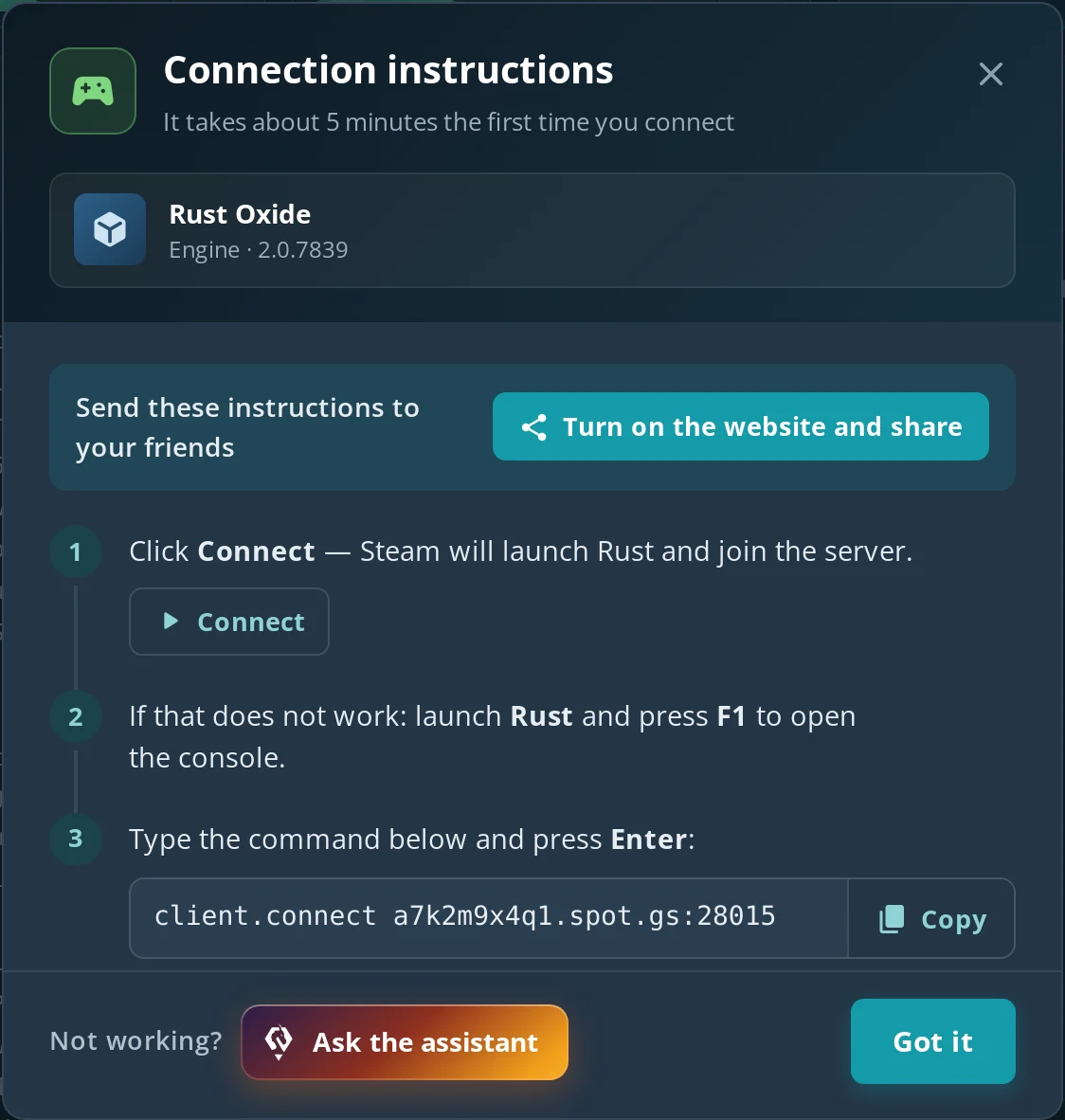
Open the F1 console and type client.connect IP:port, e.g. client.connect 203.0.113.10:28015. The game connects directly, without searching the server browser – useful for private servers and servers that don't show up in the list yet.
- The port is the server's game port – 28015 by default. RCON and query ports are different and you can't join through them.
client.disconnectleaves the server, and the server browser has a History tab with servers you've played on.- On Spot.gg you'll find your server's address and game port on the Network tab in the panel, and the How to connect? button opens the Connection instructions window: Connect launches Rust through Steam and joins the server, and as a fallback you get the ready
client.connect address:portcommand with a Copy button.
Which Rust commands are admin-only?
Commands that change the game – teleport, noclip, god mode, giving items, spawning, kicks and bans – only work if the server has given you admin rights with ownerid or moderatorid. On someone else's server, typing them gives nothing but an error.
| Command | What it does |
|---|---|
ownerid <SteamID64> "name" |
Makes a player an owner (typed in the server console) |
teleport "name" |
Teleports you to a player |
noclip |
Flying through walls |
god true |
God mode |
inventory.give <item> <amount> |
Gives you items, e.g. inventory.give wood 1000 |
kick / ban / banid |
Kicks and bans players |
That's just an overview. How to give yourself admin step by step, the full lists of admin and server commands, RCON and Oxide/Carbon permissions are in our guide to Rust admin commands.
How do you use admin commands on your own server?
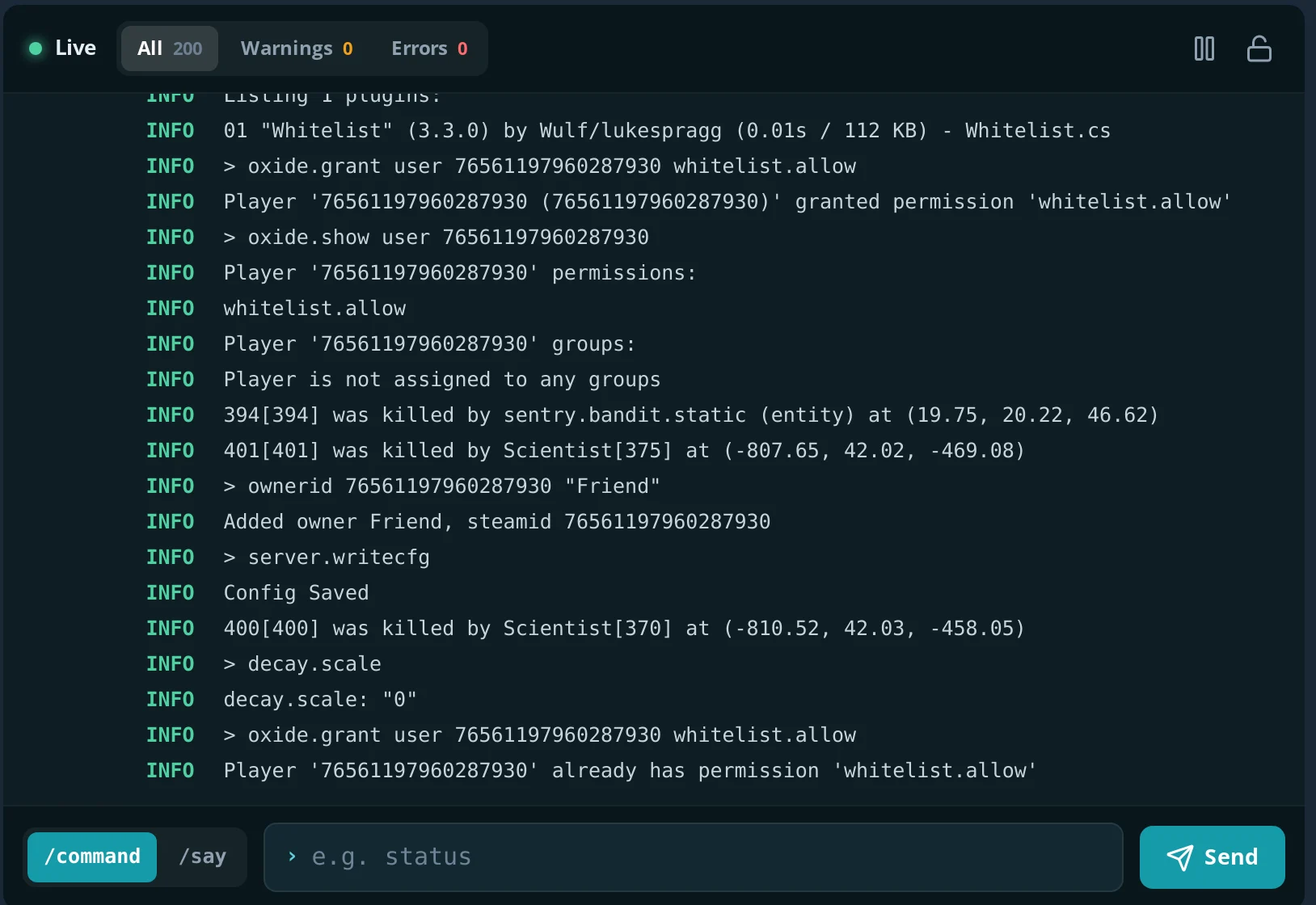
On your own server you're the owner: type ownerid with your SteamID64 in the server console, then server.writecfg, reconnect – and teleport, noclip and inventory.give work for you in the F1 console. That's handy for building tests, a creative server for friends, or just checking how a base looks from the outside.
On Spot.gg:
- The Console tab in the panel is a WebRCON console – you type server commands there (
ownerid,say,server.save) even when you're not in the game, and you see the server's replies.owneridanswers "Added owner ...", andserver.writecfganswers "Config Saved" and stores the entry inserver/spot/cfg/users.cfg. - On the Configuration tab you set the server name, description, banner, player limit (1–200), map size (1000–6000) and seed, plus the RCON password for tools such as RustAdmin.
- You choose the engine – Vanilla, Oxide or Carbon – and on Oxide/Carbon you install uMod plugins on the Addons tab, e.g. teleport or kit plugins. More in how to install Rust plugins.
A Rust server on Spot.gg (8 GB RAM, 20 GB disk) costs from $12.23 / month, and the first 24 hours are free, no card needed. A full setup walkthrough is in how to make a Rust server.
Common console problems
| Symptom | Cause | Fix |
|---|---|---|
| F1 does nothing | The console is bound to another key, or the game window isn't focused | Check the console key in the key bindings in the options, or type bind f1 consoletoggle |
| "Command not found" | Typo, a leading slash, or the command was renamed or removed | Remove the /, use find <text> to look up the current name |
noclip or teleport doesn't work |
You're not an admin on this server | Only works on servers where you have ownerid/moderatorid |
graphics.fov 120 doesn't change anything |
The value is above the maximum of 90 | Use 90 or less |
client.connect fails |
Wrong port (RCON or query instead of game port) or the server is off | Use the game port and check that the server is running |
FAQ
What is the F1 console in Rust?
It's the game's built-in command console, opened with F1. Players use it for settings (FOV, FPS, binds), connecting to servers and checking combatlog; admins use it for commands like teleport or noclip.
Can you get banned for using console commands?
No. Console commands are part of the game. Commands that would give an unfair advantage are simply blocked for players who aren't admins; bans are for cheats, not for the console.
What is the max FOV in Rust?
- Type
graphics.fov 90in the F1 console or move the field of view slider in the game options to the end.
Is there a teleport command for players?
Not in vanilla Rust – teleport is admin-only. Many community servers add teleports with plugins, used through chat commands such as /tpr or /home that the server describes in its rules.
How do I make an auto-run bind in Rust?
Open the F1 console and type bind k forward;sprint (any free key instead of K). Remove it with unbind k.