

What is a Rust build server?
A Rust build server is a server for designing and testing bases: building is free or nearly free, structures don't decay, and you can spawn items and explosives instead of farming them. It isn't a place to play the survival game – it's a sandbox where you prepare for the real wipe.
What players use build servers for:
- Base designs – trying out a layout (a starter, a 2x2, a bunker, a compound) before building it under time pressure on a live server.
- Raid tests – checking which side of a wall is the soft side, how many explosives an entrance really takes, whether a bunker can be raided another way.
- Build costs – knowing exactly how much wood, stone, metal fragments and high quality metal a base needs, so you know what to farm on wipe day.
- Practice – learning building tricks (honeycomb, airlocks, shooting floors, roof access) without wasting resources.
- Content – recording base tutorials and screenshots without other players in the frame.
Can you play on public Rust build servers?
Yes – the community runs public build and creative servers, usually in the Modded tab of the server browser with "build" or "creative" in the name. They're a good start if you only want to try a design for an hour. Their downsides show up once you build regularly:
| Public build server | Your own build server | |
|---|---|---|
| Rules and plugins | Set by the owner | You choose them |
| Your designs | Visible to other players on the server | Only you and your team see them |
| Wipes | On the owner's schedule | When you decide |
| Admin commands | Usually limited to chat commands from plugins | Full access: noclip, god, inventory.give, spawn |
| Raid tests | Often restricted or turned off | Any explosives, any time |
| Cost | Free | A paid server (or a free test run) |
If your clan plans bases for every wipe, you don't want other players watching you build the next one. That's the main reason teams run a private build server.
How do you make your own Rust build server?
Run a Rust server on Oxide or Carbon, install a free-building plugin, turn decay off with decay.scale 0, make yourself admin and set a small map and a low player limit. Step by step on Spot.gg:
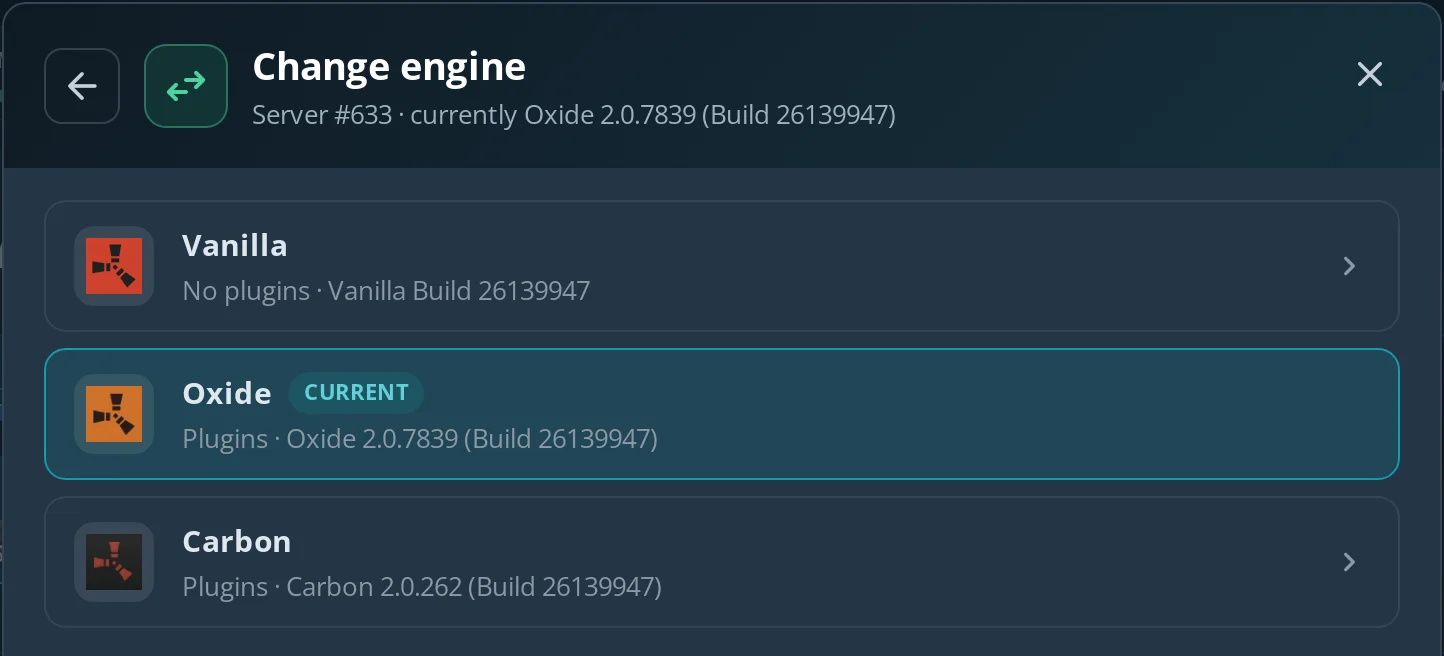
- Engine – choose Oxide or Carbon when you create the server, or switch later in Information → Modify → Change engine. Plugins don't work on Vanilla, and the Addons tab only shows up on Oxide and Carbon.
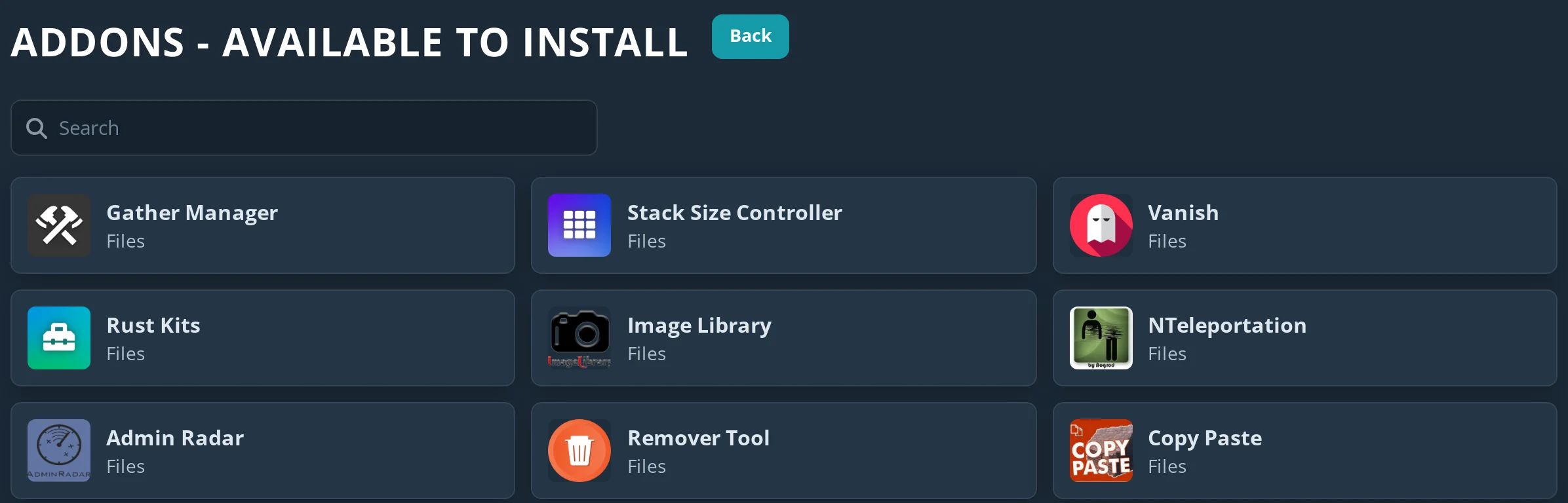
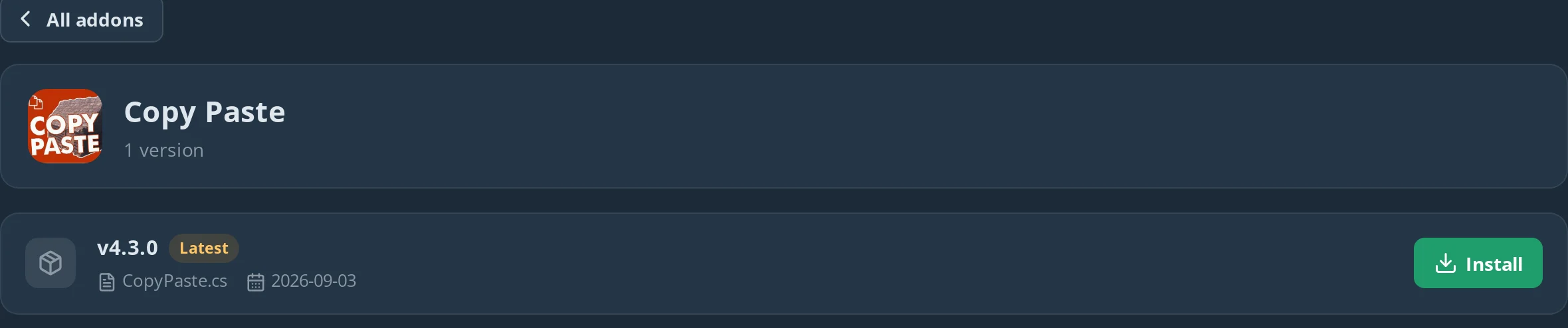
- Plugins – on Addons → Available to install, search for the plugins from the table below and click Install. On a running Oxide server the plugin loads right away, without a restart – the console shows e.g.
Loaded plugin Copy Paste v4.3.0.
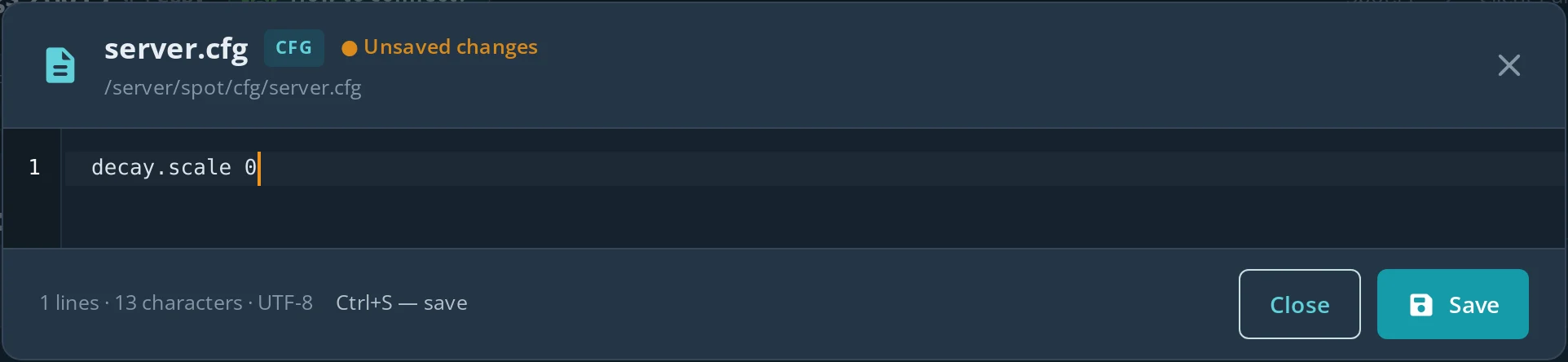
- Decay off – on the Files tab open
server/spot/cfg, openserver.cfg(or create it with Create file), add the linedecay.scale 0, save and restart the server. After the start, typingdecay.scaleon the Console tab returnsdecay.scale: "0".
- Admin rights – on the Console tab type
ownerid <your SteamID64> "name", thenserver.writecfg, and reconnect. Details in Rust admin commands. - Map and slots – on the Configuration tab set a small Map size and a low Max players (more below), save and restart.
- Join – press F1 in game and type
client.connect address:portwith the address from the panel.
decay.scale is a Rust server variable: 1 is normal decay, 0 turns it off, so buildings stand even with an empty tool cupboard. If you'd rather control decay per item or deployable, use the No Decay plugin instead.
A Rust server on Spot.gg (8 GB RAM, 20 GB disk) costs from $12.23 / month, and the first 24 hours are free, no card needed.
Which plugins does a Rust creative server need?
The core of a creative server is free building and upgrading, plus god mode, instant crafting and a way to copy bases. All plugins in the table are in the Rust plugin catalog and install on the Addons tab in one click:
| Plugin | What it does on a build server |
|---|---|
| Free Build | Building, upgrading and placing deployables cost nothing (permission freebuild.allow) |
| Building Grades | Upgrades or downgrades a whole building at once instead of block by block |
| Build Cost | Calculates what a structure and its deployables cost (cost, bcost, buildcost) |
| Copy Paste | Saves a base and pastes it again – copy, paste, pasteback, undo |
| Remover Tool | Removes building blocks and entities quickly |
| Godmode | Invulnerability for players with the permission |
| Instant Craft | Items craft instantly |
| Infinite Ammo | Unlimited ammo for players with infiniteammo.use |
| Always Day | Freezes the time of day, so you never build in the dark |
| No Decay | Decay scaled or off per item type – an alternative to decay.scale 0 |
Most of these plugins only work for players who have the right permission. On a private build server the simplest way is to grant it to everyone – the default group: for example oxide.grant group default freebuild.allow on Oxide or c.grant group default freebuild.allow on Carbon. Each plugin's permission names are on its catalog page and on uMod. More on installing and configuring plugins in how to install Rust plugins.
Which admin commands are useful on a build server?
Once you're an owner, the F1 console gives you everything you need to build and raid without farming: noclip, god true, inventory.give, spawn and env.time. These are Rust's own commands, so they work without plugins:
| Command | What you use it for |
|---|---|
noclip |
Fly around the base and check it from outside and above |
god true |
No damage while testing traps, turrets and explosives |
inventory.give wood 10000 |
Building materials without farming (also stones, metal.fragments, metal.refined) |
inventory.give explosive.timed 10 |
C4 for raid tests (ammo.rocket.basic for rockets, rocket.launcher for the launcher, explosive.satchel for satchel charges) |
env.time 12 |
Midday, good light for building and screenshots |
spawn minicopter.entity |
A vehicle next to you, e.g. to check roof access |
inventory.give gives you the item itself, so you don't need its blueprint – handy for doors, turrets or a tool cupboard. The full list of admin commands, including RCON, is in Rust admin commands.
How do you test raids on a build server?
Build the base, save it with Copy Paste, raid it with spawned explosives and paste it back – then you can test another raid path on the same base. A workflow that works well:
- Build the base and save it:
/copy mybasein chat. - Check the cost with Build Cost, so you know what to farm on the live server.
- Give yourself explosives with
inventory.giveand raid from different sides – count what each entrance really takes. - Restore the base on the same spot with
/pasteback mybaseand try another path.
On a paid server you can also take a backup on the Backup tab before a big test and restore it afterwards – the whole world goes back to the moment of the backup. Backups aren't available on the free trial server.
Which settings suit a Rust build server?
A small map, a few slots and a name that says what the server is for – the rest stays as on a normal server.
- Map size – a build server doesn't need a big island: 1000–2000 is enough, and a small map generates faster on startup. Pick a seed with flat ground or the terrain you'll build on later. More in Rust map size and seed.
- Max players – set it to the size of your team (the field accepts 1–200, the default is 50).
- Server name and description – something like
[BUILD]in the name and the rules in the description, if you let other players in. - RAM – 8 GB, the minimum for Rust on Spot.gg, is enough for a small build server for a team. Add memory in the panel if you build lots of big bases side by side.
- Who can join – Rust has no server password and the server is visible in the server browser. If you want only your team on it, use a whitelist plugin – Whitelist by Wulf from uMod isn't in the catalog, so upload its file to
oxide/pluginsorcarbon/pluginson the Files tab.
Wipes and updates on a build server
On a build server you wipe by hand when you want a clean map: Information → Modify → Wipe, "Map" or "Map + blueprints". The panel stops the server first, and the new map is generated on the next start. What survives a wipe and how it works is in the Rust wipe guide.
Keep in mind the monthly force wipe: when Facepunch releases the update, an old map can't be used on the new game version. With Automatic updates on (Configuration tab), the panel updates the server on its own and it starts on a fresh map. Bases saved with Copy Paste are files in the plugin's data folder, not part of the map, so they usually survive a wipe and you can paste them back.
Common build server problems
| Symptom | Cause | Fix |
|---|---|---|
| Free Build or Godmode does nothing | The permission is missing | oxide.grant group default freebuild.allow / c.grant ... |
| Buildings still decay | decay.scale 0 isn't in server.cfg, or the server wasn't restarted |
Check server/spot/cfg/server.cfg and restart |
| F1 commands say you're not an admin | You didn't reconnect after ownerid |
Leave the server and join again |
| No Addons tab | The server runs Vanilla | Switch the engine to Oxide or Carbon |
| A pasted base appears in the wrong place | paste places the base where you look |
Use pasteback to restore it in its original position |
FAQ
What is the best Rust build server?
For a quick test, any public build or creative server from the Modded tab will do. If you build regularly or plan bases with a team, your own private build server is better: your own plugins, full admin commands and nobody watching your designs.
Can you make a Rust creative server on Vanilla?
Partly. Admin commands such as noclip, god and inventory.give work on Vanilla, and decay.scale 0 too. Free building, instant crafting or copying bases need plugins, which run on Oxide or Carbon.
How do I turn off decay on my Rust server?
Add decay.scale 0 to server.cfg (on Spot.gg: Files → server/spot/cfg) and restart the server. For more control, install the No Decay plugin.
Can I copy my base from the build server to my main server?
Technically yes – the Copy Paste plugin saves bases to files you can move between servers. On a live server it's only fair on your own server or with the owner's consent, as pasting a ready base skips the whole game.
How much RAM does a Rust build server need?
A small build server for a team runs on 8 GB, the minimum for Rust on Spot.gg. Memory grows with the number of buildings, entities and plugins, so add RAM if you keep lots of big bases on one map.